Mailchimp offers several pricing plans built for different types of users, from a free option for basic email marketing to more advanced plans for growing businesses and larger teams. As an email marketing and marketing automation platform, it helps businesses connect with their audiences through email campaigns, customer journeys, segmentation, and other marketing tools.
In this article, we break down Mailchimp’s pricing plans, core features, and the main pros and cons of each option. We’ll also cover which plan may be the best fit for your needs, highlight any additional costs to watch for, and share a few tips to help you get the most value from your investment.
Connect your Mailchimp account with Landingi to quickly send leads to this platform, enjoy the benefits of both apps, and streamline your workflow!
How Much Does Mailchimp Cost?
Mailchimp costs range from $0 to $1,600+ per month, depending on your plan and the size of your contact list.
There are four main plans in Mailchimp:
- Free
- Essentials
- Standard
- Premium
Pricing is primarily based on how many contacts you have, and each plan comes with different levels of features and monthly email send limits.
How much is Mailchimp per month?
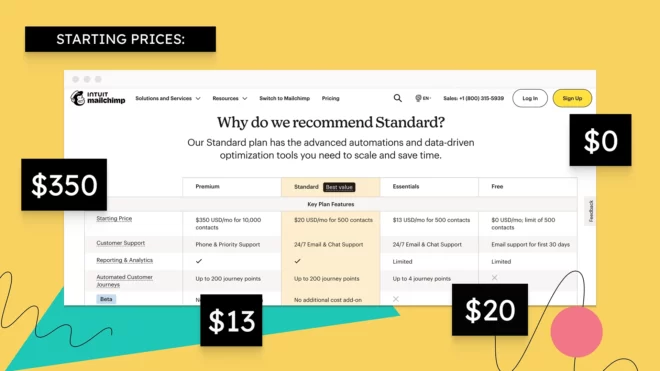
Mailchimp’s monthly costs are structured across four main plans: Free, Essentials, Standard, and Premium. The paid plans range from $13 per month for up to 500 contacts to $1,600 per month for up to 200,000 contacts, with custom pricing available.
Here’s a breakdown of the monthly cost for Mailchimp based on plans, number of email sends, and contacts:
Free plan – $0/month
Best for individuals or small teams just getting started.
- Up to 500 contacts
- Up to 1,000 email sends/month
- Basic templates, segmentation, and reporting
- Mailchimp branding
- Limited support
Essentials plan – starts at ~$13/month
Best for small businesses that need core email marketing features.
- 500 contacts: ~$13/month
- 1,500 contacts: ~$26.50/month
- 5,000 contacts: ~$75/month
- 10,000 contacts: ~$110/month
- Send limit: ~10x contact count/month
Mailchimp’s Essentials plan includes:
- Email templates and scheduling
- A/B testing
- Basic automation
- 3 seats
Standard plan – starts at ~$20/month
Best for growing teams that want automation and better insights.
- 500 contacts: ~$20/month
- 1,500 contacts: ~$45/month
- 10,000 contacts: ~$135/month
- 50,000 contacts: ~$450/month
- Send limit: ~12x contact count/month
Mailchimp’s Standard plan includes:
- Advanced segmentation
- Customer journey builder
- Enhanced reporting
- Multi-step automations
- 5 seats
Premium plan – starts at ~$350/month
Best for large teams managing big lists or needing advanced features.
- 10,000 contacts → ~$350/month
- 25,000 contacts → ~$620/month
- 50,000 contacts → ~$815/month
- 100,000 contacts → ~$1,025/month
- 200,000 contacts → ~$1,600/month
- 300,000+ → custom pricing
- Send limit: ~15x contact count/month
Mailchimp’s Premium plan includes:
- Advanced segmentation
- Unlimited seats
- Priority support
- Onboarding and migration support
Is Mailchimp worth the cost?
Deciding if Mailchimp is worth the money largely depends on your business needs and budget, but its extensive features and scalability can make it a valuable investment. For many teams, it delivers strong value thanks to its all-in-one setup, combining email marketing, automation, analytics, and integrations in a single platform.
For small to mid-sized businesses, Mailchimp is often a solid investment. Plans like Essentials and Standard offer a good balance of features and pricing, giving you enough tools to run effective campaigns, build automations, and track performance without overcomplicating things.
Where it can get tricky is at scale. As your contact list grows, so do your costs, sometimes quickly. And some of the more advanced features are only available on higher-tier plans, which can push you into more expensive pricing sooner than expected.
Bottom line: Mailchimp is worth it for businesses that want a reliable, easy-to-use marketing platform. But if you’re managing a large list or need more advanced functionality at a lower cost, it’s worth comparing other options before committing.
Mailchimp Pricing Pros and Cons
Mailchimp’s pricing comes with clear advantages, but there are a few tradeoffs to be aware of – especially as your business grows.
Pros
- Flexible plans: Multiple tiers make it easy to start small and scale over time.
- Feature-rich platform: Includes email marketing, automation, analytics, and more in one place.
- Strong integrations: Connects with a wide range of third-party tool.
- Free plan available: A solid entry point for individuals and small businesses.
Cons
- Gets expensive as you scale: Costs increase quickly as your contact list grows.
- Limited lower-tier features: Some key functionality is locked behind higher plans.
- Extra costs can add up: Add-ons, overages, and upgrades can increase total spend.
Overall, Mailchimp offers a strong set of tools that justify the cost for many businesses. That said, if you’re managing a large list or need advanced features, you may find yourself moving into higher-priced plans faster than expected.
Key Mailchimp Features
Mailchimp includes a broad set of tools that go beyond basic email marketing, making it a well-rounded platform for managing and scaling your marketing efforts. Below is a breakdown of the core features and what they’re used for:
| Feature | Description |
|---|---|
| Email Marketing | Designing, sending, and tracking email campaigns. The platform includes customizable email templates, A/B testing, and segmentation options. |
| Marketing Automation | Automating various marketing tasks such as sending welcome emails, follow-up messages, and abandoned cart notifications. Automation workflows can be customized. |
| AI Marketing Tools | AI-driven features include predictive analytics, content optimization, and personalized product recommendations. |
| Websites | Creating and hosting websites and landing pages. The platform offers a drag-and-drop builder, pre-designed templates, and customization options. |
| Reporting & Analytics | Tracking the performance of email campaigns, websites, and other marketing activities. Users can access detailed reports on open rates, click-through rates, and ROI. |
| Content Creation Tools | Creating visually appealing emails, ads, and other marketing materials. Mailchimp includes a variety of design templates, stock photos, and a built-in photo editor. |
| Social Media Marketing | Managing and analyzing social media campaigns. Users can schedule posts, track engagement, and gain insights into social media performance. |
| Audience Management | Managing and segmenting contacts. Mailchimp offers tools for audience segmentation, tagging, and detailed contact profiles. |
These features make Mailchimp a versatile option for businesses that want more than just email. Whether you’re running simple campaigns or building out full customer journeys across channels, the platform provides the tools to support both.
Mailchimp Pricing Plan Comparison
Below is a comparison of Mailchimp’s pricing plans, their costs, and the type of users they are best suited for:
| Plan | Monthly Billing Rates | Best For |
|---|---|---|
| Free | $0 | Individuals or small startups with basic email marketing needs |
| Essentials | Starts at $13 | Small businesses requiring essential email marketing tools and templates |
| Standard | Starts at $20 | Growing businesses needing advanced automation and enhanced analytics |
| Premium | Starts at $350 | Large businesses requiring comprehensive marketing tools and priority support |
Overall, Mailchimp’s pricing is flexible, but costs increase as your contact list and feature needs grow.
Which Mailchimp plan should I choose?
You should start with the Mailchimp plan that best matches your current business size and marketing needs.
- Free – Best if you’re just getting started or testing email marketing
- Essentials – Good for small businesses that need basic automation and templates
- Standard – Ideal for growing teams that want stronger automation and reporting
- Premium – Best for large teams managing big lists or needing advanced features
Most businesses eventually land on Standard, since it offers the best balance of features and cost.
Mailchimp Additional Costs
Additional costs in Mailchimp can arise because your base plan isn’t always the full cost. A few things can increase your monthly spend on Mailchimp:
- Contact overages as your list grows
- Email send overages if you exceed monthly limits
- SMS marketing credits (paid separately)
- Onboarding or add-on services
These costs can add up quickly, especially as you scale, so it’s important to keep an eye on usage.
Mailchimp Pricing Tips
To get the most out of Mailchimp pricing:
- Keep your list clean. Remove inactive contacts so you’re not paying for subscribers you don’t use
- Be intentional with sends. Plan campaigns to stay within your monthly send limits
- Don’t upgrade too early. Use integrations and optimize what you have before moving to a higher plan
Mailchimp vs Landingi Pricing
Mailchimp and Landingi serve different core purposes, so pricing comes down to what you actually need. Both platforms offer comprehensive tools for managing online businesses, including marketing and customer engagement.
Mailchimp is an all-in-one marketing platform focused on email marketing, automation, and audience management. Its pricing scales based on your contact list, making it a strong option if you want to manage campaigns, automations, and reporting in one place.
Landingi is a landing page operation system built specifically for landing page creation, optimization, and automation. Landingi’s pricing is more predictable, with plans including:
- Build (starting at $24/mo.)
- Optimize (starting at $119/mo.)
- Scale (starting at $229/mo.)
- Enterprise (starting at $1199/mo.)
Landingi stands out for its landing page builder, large library of over 400 customizable templates, A/B testing capabilities, and design flexibility. Landingi’s ecosystem also includes advanced AI-powered solutions such as Lunar for generating ready-to-edit landing pages from prompts and Solis for turning behavioral data into actionable optimization insights, alerts, and recommendations. Combined with AI features for content generation, SEO content creation, and image background removal, as well as over 170 integrations with MarTech tools, this makes Landingi a strong choice for teams focused on building, optimizing, automating, and scaling high-converting landing pages in one place.
One key advantage is that Landingi integrates directly with Mailchimp, allowing you to capture leads on landing pages and automatically send them into your email marketing workflows.
More control. More conversions. Less complexity. Start building smarter with Landingi today.
Which platform should you choose?
- Choose Mailchimp if you need a full marketing platform with email, automation, and analytics.
- Choose Landingi if you’re focused on landing pages and conversion optimization.
- Use both together if you want a strong lead generation + email marketing setup.
In short, Mailchimp is better for managing and nurturing your audience, while Landingi is better for capturing and converting it.
Mailchimp Pricing FAQ
Here are answers to some of the most common questions about Mailchimp pricing:
Why is Mailchimp so expensive?
Mailchimp can be expensive because its pricing increases as your contact list grows. Since costs are tied to audience size and usage, larger lists and higher send volumes can make it more expensive over time – especially if you need advanced features.
What is the cheapest Mailchimp plan?
The cheapest option in Mailchimp is the Free plan, which includes up to 500 contacts and 1,000 monthly email sends.
What is the best Mailchimp alternative?
If you’re focused on landing pages and lead generation, Landingi is a strong alternative to Mailchimp. If you’re looking for full email marketing and automation, other tools like HubSpot or Klaviyo may also be worth comparing.
Can I use Mailchimp for free?
Yes, Mailchimp offers a free plan with limited features. It’s a good option for testing the platform or running basic email campaigns before upgrading.
Final Thoughts on Mailchimp Pricing
Mailchimp remains one of the most popular marketing platforms for a reason – it’s easy to use, feature-rich, and scales well as your business grows.
For small to mid-sized businesses, it offers strong value, especially if you’re looking for an all-in-one solution for email, automation, and audience management. The main downside is cost, which can increase quickly as your contact list expands or as you move into higher-tier plans.
If your primary focus is on landing pages, marketing automation, and conversion optimization, Landingi can be a more cost-effective option. Many businesses also use both tools together – Landingi to capture leads, and Mailchimp to nurture them.
Ultimately, the right choice comes down to your goals. If you want a single platform to manage and grow your marketing efforts, Mailchimp is a strong option. If you’re more focused on lead generation and page performance, pairing it with (or replacing it with) a dedicated landing page tool may make more sense.
Explore Landingi’s features and see how it can cater to your needs. Join Landingi for free today and unlock its potential to supercharge your marketing strategies through seamless integration with Mailchimp!